Running the Gateway Client
The Gateway Client utility is a command-line utility for processing Diagnostics Requests or Operations Requests.
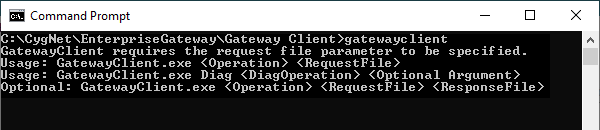
To run the Gateway client, type gatewayclient at the prompt, followed by the command parameters.
At a minimum, the following must be specified.
- The operation to be performed.
- The name of the RequestFile (if required).
For a full list of parameters, type gatewayclient and press Enter.
|
Gateway Client Parameters |
Diagnostics Requests
Diagnostics requests provide information about the Enterprise Gateway or allow you to change certain configuration parameters of the Enterprise Gateway.
| Diagnostic Operation | Description |
|---|---|
|
getDiagInfo (gdi) |
Returns the following information:
|
|
pingGateway (pg) |
Shows the ping time from the client to the Enterprise Gateway. |
|
refreshPackage (rp) |
Synchronizes the package in the Gateway with the one in the Enterprise Operations EIE. |
All diagnostic operations will generate output files, but you can optionally specify the output file name. If the name is not specified, the
operation will generate a file with the name formatted as follows:
|
EntDiagResp_{#### <year>}{## <month>}{## <day>}_{## <hour>}{## <minute>}{##<second>}{### <millisecond>}.xml |
Example
|
EntDiagResp_20230312_101420458.xml |
Operations Requests
For information about the Enterprise Operations Requests that can be performed using the Gateway Client, see Operations.


